Recurno is a privacy-first subscription tracker. Know where your money goes.
Recurno tracks recurring payments without a bank login: renewals, household spend, and 45 currencies kept separate. Free for up to 30 subscriptions.
- Netflix
- Spotify
- Adobe CC
- iCloud
- Figma
- ChatGPT
- Disney+
- Notion
- Dropbox
- Amazon Prime
- GitHub
- Strava
- Duolingo
- YouTube Premium
- Linear
- Vercel
- 1Password
- HBO Max
- 30
- Subscriptions, free foreverNo card, no trial countdown
- 45
- Currencies supportedOne per subscription
- 3 days
- Warning before a renewalOne email per cycle
- $2.99
- Pro, per monthCancel any time from Settings
Your recurring spend, finally visible
Dashboard · live view
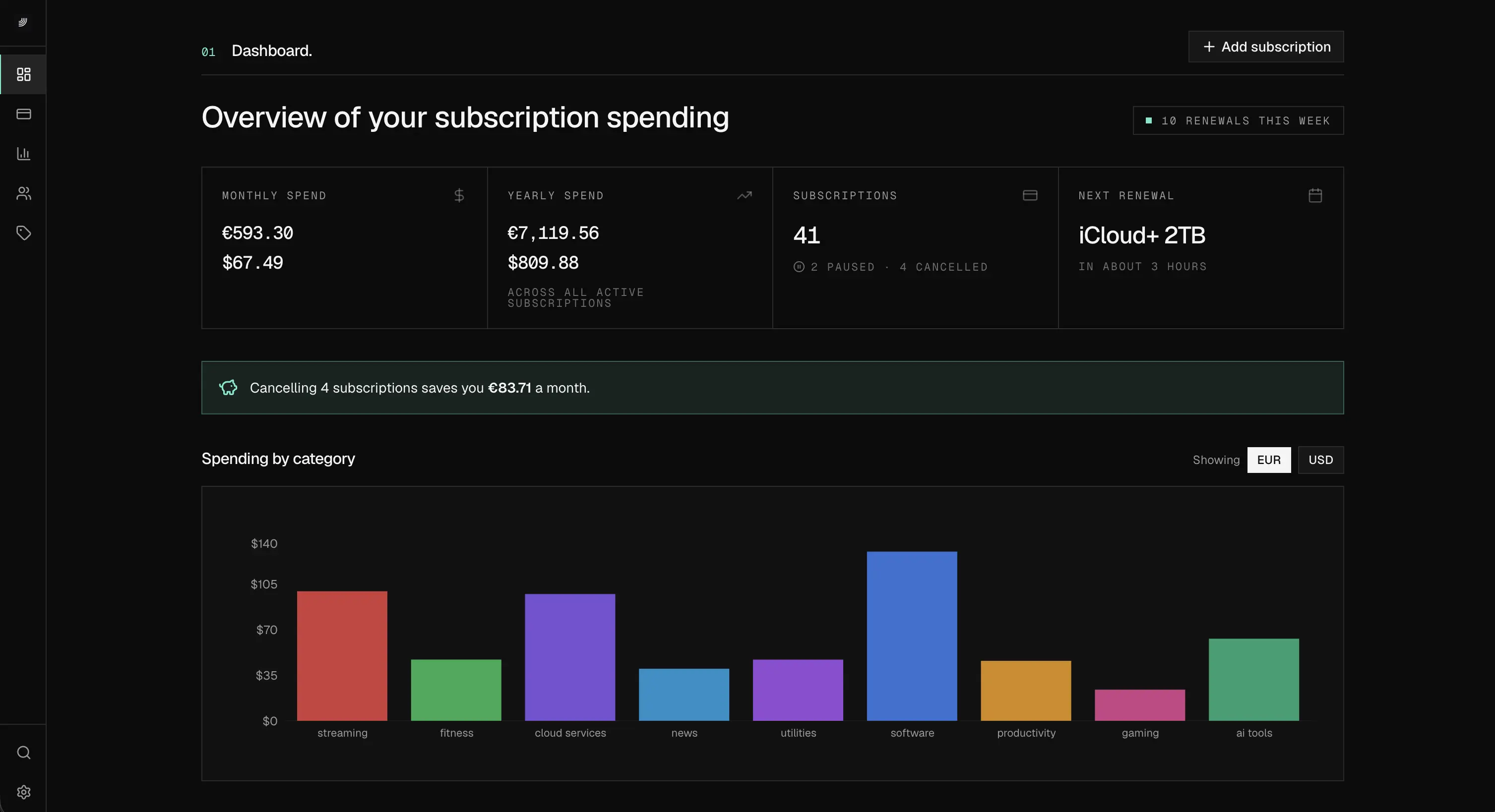
Every recurring charge, in one ledger
Add a service once and Recurno holds the cost, the cycle, the renewal date and the cancel link. Paused and cancelled plans stay on the books so the saving stays visible.
- 1.1
Monthly and yearly, normalised
Annual plans are divided down before anything is summed, so the parts always add up to the total.
- 1.2
Per-subscription currency
A household can pay for Spotify in euros and Figma in dollars. Totals group by currency instead of inventing an exchange rate.
- 1.3
Cancel links on the record
Store the URL that actually cancels the thing, next to the charge that keeps arriving.
- NetflixMON3D$17.99
- Spotify FamilyMON9D$19.99
- Adobe CCYEA24D$59.99
- iCloud 2TBMON31D$9.99
- FigmaMON44D$12.00
See the shape of your spend, not a pile of receipts
Burn rate by month, by category, by person. Twelve months of history and a flat forward projection, so you can tell a bad month from a bad habit.
- 2.1
Category breakdown
Six defaults out of the box, unlimited custom categories on Pro.
- 2.2
Twelve-month trend
Watch the line move after you cut something, which is the only proof that matters.
- 2.3
Most expensive, ranked
Sorted by annual cost, because a $59.99/yr plan hides better than a $10/mo one.
Household spend, split honestly
Who pays for it and who uses it are two different questions. Recurno tracks both, which is how duplicate family subscriptions finally become visible.
- 3.1
Owner versus assigned
One person pays; three people use it. Both are recorded, so nobody argues from memory.
- 3.2
Per-member totals
Normalised monthly figures per person, ready for the conversation about the second Netflix account.
- 3.3
You are not a seat
The account holder is a name in the list, not one of your plan's household slots.
- JKYou7 subscriptions$38.94
- MRMara4 subscriptions$18.03
- TSTom2 subscriptions$8.00
Email before the charge, not after it
Free emails you three days before a renewal. Pro can stack 1, 3, 7 and 14 days. Reminders are keyed to the renewal itself, so one email goes out per billing cycle, never a duplicate and never a skipped window.
- 4.1
Dates anchored to UTC
Your renewal date is the date you picked, whichever side of the meridian you are on.
- 4.2
One email per cycle
Multiple thresholds collapse into a single send, claimed against the occurrence rather than the day.
- 4.3
Send yourself a test
Verify delivery from Settings before you trust it with a renewal you care about.
- D3Netflix$17.99
- D9Spotify$19.99
- D24Adobe$59.99
Email lands 3 days before each charge
Two plans. One of them is free forever.
We are a subscription too, and that is the point. Every dollar goes into the product: no ads, no data selling, no growth hacks.
Free
No card requiredEnough to find out where the money actually goes.
$0/forever
- Up to 30 subscriptions
- 2 household members
- Basic dashboard analytics
- Renewal reminder three days ahead
- CSV export
- 45 currencies
Pro
7-day free trialFor stacks that renew faster than you can remember them.
$2.99/month
- Up to 100 subscriptions
- Unlimited household members
- Full analytics and charts
- Custom categories
- AI savings coach
- PDF and CSV export
- Reminders at 1, 3, 7 and 14 days
Lose Pro and nothing is deleted — you keep every record, you just cannot add more until you are back under the limit. Full pricing details
Built for stacks that actually renew
Whether you share Netflix or bill hours against a SaaS pile, Recurno keeps recurring spend honest.
Households & families
Assign shared plans, see who uses what, and review renewals before seats and price hikes auto-charge.
Household trackingBFreelancers & solo operators
Track design, AI, and cloud tools that eat margin on quiet weeks, with exports your bookkeeper will accept.
Freelancer SaaS trackingCCouples
Two cards quietly funding the same streaming service. Put both lists in one place and the duplicate shows itself.
Shared subscriptionsDStudents
Student pricing is the best deal in software until the discount lapses and the card gets charged at full rate.
Student stacksWant the long version? What a subscription tracker should do / Why we never ask for your bank / Multi-currency totals that stay honest
No bank login, ever
You add what you want tracked. Recurno never asks for banking credentials and has nothing to leak if it did.
Your data leaves whenever you want
CSV, PDF on Pro, and a full JSON backup of the account. Deleting the account removes the data and cancels billing with it.
No ads, no data selling
The $2.99 is the business model. There is no second one hiding behind it.
Subscription tracking, answered plainly
01What is Recurno?+
Recurno is a privacy-first subscription tracker. You add each recurring payment yourself, so it never asks for a bank login. It lists renewals, household spend, and unused charges for individuals and families.
02Is Recurno free?+
Yes. Free includes up to 30 subscriptions, 2 household members, basic analytics, and CSV export. Pro is $2.99/month for 100 subscriptions, unlimited household members, advanced analytics, custom categories, PDF export, and AI savings insights.
03How is Recurno different from a spreadsheet?+
Spreadsheets do not remind you before renewals, assign spend to household members, or surface waste automatically. Recurno is built for recurring charges, renewals, categories, pause, and exports, without maintaining formulas.
04Can I track household or family subscriptions?+
Yes. Assign subscriptions to household members, see who uses shared plans like Netflix or Spotify, and review spend by person. Free includes 2 members; Pro unlocks unlimited.
05Does Recurno connect to my bank?+
No. You add or import the subscriptions you care about. That keeps setup simple, avoids fragile bank connections, and puts you in control of what is tracked.
06Is Recurno the same as Recurro or similarly named apps?+
No. Recurno is a web app at recurno.com: you sign in from a browser, add subscriptions yourself, and it never asks for a bank login. Recurro, Recurio and Recurzo are separate products.
07Can Recurno help me cancel unused subscriptions?+
Recurno shows upcoming renewals, attention insights, and (on Pro) AI tips for free alternatives so you can cancel or pause before the next charge, not after it hits your statement.
08How do I track all my subscriptions in one place?+
Create a free account, add each recurring payment with its cost, billing cycle and renewal date, then assign a category. Recurno normalises monthly and yearly plans to one monthly figure, so the dashboard shows a single running total and the next charges in date order.
09How do I find subscriptions I have forgotten about?+
Scan the last three months of bank and card statements for repeating amounts, then check the app stores and any email receipts filed under billing. Add each one to Recurno as you find it. Yearly plans are the ones people miss, because a charge that appears once a year hides better than a monthly one.
10What is the best free subscription tracker?+
That depends on whether you want bank linking. Recurno is free for up to 30 subscriptions with no card and no trial countdown, and it works from what you enter rather than a bank connection, so it never asks for your banking credentials. Tools that link accounts find charges automatically but require that access.
11Does Recurno handle more than one currency?+
Yes. Each subscription carries its own currency, and 45 are supported. Amounts in different currencies are never added together, because there is no exchange rate behind them: totals are grouped per currency, and charts are scoped to one currency at a time.
12Can I export my subscription data?+
Yes. CSV export is on the free plan, PDF reports are on Pro, and a full JSON backup of your account is available in Settings. You can also delete your account and everything in it from the same page.
Stop guessing
Own your spend.
Free forever for up to 30 subscriptions. No credit card, no trial countdown, no email drip.